NATS JetStream Dead Letter Queue: Complete Implementation Guide
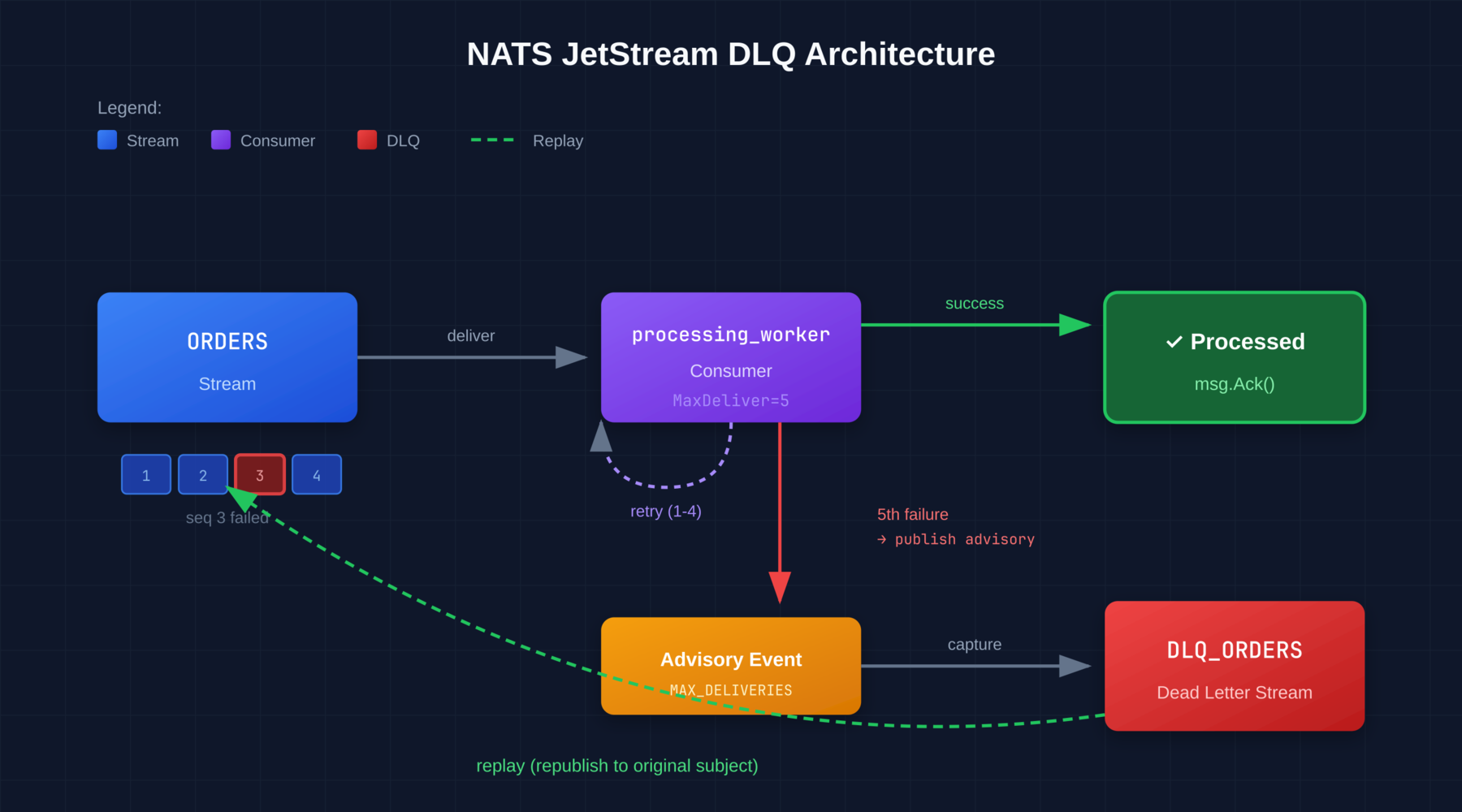
Implementing a Retry and DLQ Strategy in NATS JetStream
If you are moving from RabbitMQ or Kafka to NATS JetStream, you usually feel a sense of relief. The configuration is simpler, the binaries are smaller, and the performance is excellent.
But eventually, you hit the “Day 2” reality of event-driven architectures: Message Failures.
When a consumer fails to process a message, you can’t just drop it. You need a retry policy, and eventually, a Dead Letter Queue (DLQ). While NATS provides all the primitives to build this, it does not provide a “system” out of the box. You have to wire it yourself.
This guide walks through how to architect a robust DLQ flow using native JetStream features, and how to manually handle message replays when things go wrong.
Prerequisites
- NATS Server with JetStream enabled (
nats-server -js) natsCLI installed- Basic understanding of NATS streams and consumers
The Architecture of Failure
In JetStream, a DLQ isn’t a special checkbox; it’s just another Stream. To set this up correctly, you need a specific topology involving MaxDeliver, proper acknowledgment handling, and advisory message capture.
1. The Retry Policy
First, your consumer configuration determines how many times NATS attempts to deliver a message before giving up.
When you configure your consumer, pay attention to MaxDeliver and BackOff. A linear retry is rarely what you want. You want a geometric backoff to prevent thundering herd scenarios on your database.
nats consumer add ORDERS processing_worker \
  --max-deliver=5 \
  --backoff=1s,5s,1m,5m,10m
Important: The BackOff configuration only applies to acknowledgment timeouts, not to explicit NAK responses. When a consumer sends a Nak(), the message is redelivered immediately. To add delay on an explicit NAK, use NakWithDelay() in your client code:
// Immediate redelivery
msg.Nak()

// Delayed redelivery (recommended for transient failures)
msg.NakWithDelay(5 * time.Second)
2. The Dead Letter Stream
Once MaxDeliver is reached, the consumer stops attempting to deliver that specific message. The message is not deleted—it remains in the stream but is simply skipped by that consumer. To capture these failures, we use JetStream’s advisory system.
When a message exhausts its delivery attempts, NATS publishes an advisory to:
$JS.EVENT.ADVISORY.CONSUMER.MAX_DELIVERIES.<STREAM>.<CONSUMER>Similarly, when your application explicitly terminates a message using Term(), an advisory is published to:
$JS.EVENT.ADVISORY.CONSUMER.MSG_TERMINATED.<STREAM>.<CONSUMER>Setting Up the DLQ Stream
Create a stream that captures these advisory messages:
nats stream add DLQ_ORDERS \
  --subjects='$JS.EVENT.ADVISORY.CONSUMER.MAX_DELIVERIES.ORDERS.*,$JS.EVENT.ADVISORY.CONSUMER.MSG_TERMINATED.ORDERS.*' \
  --storage=file \
  --retention=limits \
  --max-age=72h
The advisory payload looks like this:
{
  "type": "io.nats.jetstream.advisory.v1.max_deliver",
  "id": "EgGS1FReM5Yy1I7L9UXs4W",
  "timestamp": "2023-12-24T14:38:13.107632319Z",
  "stream": "ORDERS",
  "consumer": "processing_worker",
  "stream_seq": 6,
  "deliveries": 5
}
The stream_seq field is critical-it tells you exactly which message failed, and you can retrieve it directly:
nats stream get ORDERS 63. Using Term for Explicit Dead-Lettering
Instead of waiting for MaxDeliver to be exhausted, your consumer can explicitly terminate a message using Term(). This immediately stops redelivery and publishes an advisory.
Use this when your application can determine a message is permanently unprocessable:
// Message is malformed or missing required data
if !isValidPayload(msg.Data()) {
    msg.Term()  // Immediately dead-letter, don't retry
    return
}
The “Hard Way” (Manual) Replay Workflow
Let’s assume you have a setup where failed messages have triggered advisories in DLQ_ORDERS.
It’s 3:00 AM. An invalid payload caused 500 messages to hit the DLQ. You’ve pushed a hotfix to the consumer code to handle this payload. Now, you need to replay those 500 messages.
NATS does not have a “Replay” button. You have to do this via the CLI or a custom script. Here is the manual workflow for replaying messages without data loss.
Step 1: Inspect the DLQ Advisories
First, view the advisory messages to understand what failed:
nats stream view DLQ_ORDERS 10Each advisory contains the stream_seq of the original message. To inspect the actual failed message:
nats stream get ORDERS <stream_seq>Look at the headers and payload to understand why processing failed.
Step 2: Republishing
You need to read the failed messages and publish them back to the original subject (orders.created), not the DLQ subject.
Note: The nats stream backup and nats stream restore commands are designed for disaster recovery, not for selective message replay. They create binary snapshots and restore to the same stream, which isn’t what we want here.
For a single message, you can replay it directly:
seq=6  # The stream_seq from the advisory
SOURCE_STREAM="ORDERS"
msg=$(nats stream get $SOURCE_STREAM "$seq" --json)
subject=$(echo "$msg" | jq -r '.subject')
echo "$msg" | jq -r '.data' | base64 -d | nats pub "$subject"
For batch replay of all DLQ advisories:
#!/bin/bash
# Replay all failed messages from DLQ advisories

DLQ_STREAM="DLQ_ORDERS"
SOURCE_STREAM="ORDERS"

# Get both first and last sequence numbers
info=$(nats stream info "$DLQ_STREAM" --json)
first_seq=$(echo "$info" | jq -r '.state.first_seq')
last_seq=$(echo "$info" | jq -r '.state.last_seq')

for i in $(seq "$first_seq" "$last_seq"); do
    # Get advisory and extract source stream sequence
    advisory=$(nats stream get "$DLQ_STREAM" "$i" --json 2>/dev/null) || continue
    stream_seq=$(echo "$advisory" | jq -r '.data' | base64 -d | jq -r '.stream_seq')

    # Get original message
    original=$(nats stream get "$SOURCE_STREAM" "$stream_seq" --json 2>/dev/null) || continue
    subject=$(echo "$original" | jq -r '.subject')
    data=$(echo "$original" | jq -r '.data' | base64 -d)

    # Republish
    echo "$data" | nats pub "$subject"
    echo "Replayed seq=$stream_seq to $subject"
done
The Friction Points
If you are doing this manually during an incident, you face several issues:
Deduplication edge case: If you use explicit Nats-Msg-Id headers for exactly-once publishing AND you’re replaying within the dedup window (default 2 minutes), the message will be rejected. In practice, DLQ messages are usually hours old, so this rarely matters.
Ordering: If strict ordering matters, replaying from a script breaks the global order relative to new incoming messages.
Visibility: While running your script, you have no visual confirmation of the drain rate other than repeatedly running nats stream info.
The Multi-Consumer Problem
There’s a subtle but serious issue with the replay workflow above: the original message is still in the source stream.
When you replay a message by publishing it to the original subject, you’re creating a new message. If multiple consumers subscribe to the same stream-a common pattern when different services react to the same events-this can cause duplicate processing.
Consider this scenario:
ORDERSstream has two consumers:billing_workerandnotification_workerbilling_workerfails to process message seq=42 (database timeout) and it hits MaxDelivernotification_workersuccessfully processed seq=42 and sent a confirmation email- You replay seq=42 by publishing to
orders.created - Both consumers receive the replayed message
notification_workersends a duplicate email
This is particularly dangerous for side-effecting operations: duplicate charges, duplicate notifications, or duplicate API calls to external systems.
Workaround 1: Dedicated Replay Subject
Configure your consumers to subscribe to multiple subjects, including a replay-specific one:
# Original consumer subscribes to both subjects
nats consumer add ORDERS billing_worker \
  --filter='orders.created,orders.created.replay.billing'
When replaying, publish to the consumer-specific replay subject:
echo "$data" | nats pub "orders.created.replay.billing"This ensures only the failed consumer receives the replayed message.
Workaround 2: Replay Headers with Consumer Filtering
Add metadata to replayed messages so consumers can detect and handle them:
# Add replay headers when republishing
echo "$data" | nats pub "$subject" \
  --header="X-Replay: true" \
  --header="X-Original-Seq: $stream_seq" \
  --header="X-Target-Consumer: billing_worker"
Consumers check the header and skip if they’re not the target:
if msg.Header.Get("X-Replay") == "true" {
    target := msg.Header.Get("X-Target-Consumer")
    if target != "" && target != consumerName {
        msg.Ack()  // Not for us, acknowledge and skip
        return
    }
}
Workaround 3: Idempotent Consumers (The Right Way)
The most robust solution is designing consumers to be idempotent from the start. Store a processed message log keyed by stream_seq or a business-level identifier:
func processOrder(msg jetstream.Msg) error {
    orderID := extractOrderID(msg.Data())

    // Check if already processed
    if wasProcessed(orderID) {
        return msg.Ack()  // Idempotent: safe to skip
    }

    // Process and mark as done atomically
    if err := processAndMarkDone(orderID, msg.Data()); err != nil {
        return msg.NakWithDelay(5 * time.Second)
    }

    return msg.Ack()
}
This protects against replays, network retries, and JetStream’s at-least-once delivery semantics.
Automating the Pain
The workflow above-detect, inspect, script, replay-is standard practice. It works. But it is slow, and writing one-off scripts during an outage is stress-inducing.
This is exactly why we built Stream Trace.
We realized that managing NATS JetStream shouldn’t require writing Bash scripts at 3 AM to inspect terminal advisories and republish selected source messages. Stream Trace is a self-hosted UI that connects to your NATS infrastructure.
It turns the “Hard Way” into a UI workflow:
- Visual DLQ Management: Turn max-delivery and terminated-message advisories into cases you can inspect, retry, or resolve.
- Payload Inspection: Decode JSON, Text, or Hex payloads right in the browser to debug why the failure happened before you replay.
- Impact Preview and Results: Review which consumers may receive a replay and see published, skipped, or failed outcomes.
It runs in your infrastructure and keeps NATS data within the systems and integrations you configure.
If you are tired of writing one-off replay scripts, check out Stream Trace.
Further Reading
- Consumer Configuration - MaxDeliver, BackOff, AckWait
- Consumer Acknowledgments - Ack, Nak, NakWithDelay, Term
- JetStream Model Deep Dive - Internal protocol details
- Disaster Recovery - Backup and restore workflows